exiCAD Launching in the coming weeks

CAD that speaks your language.

Describe a part in plain language. The agent asks what it needs, builds it, and hands you editable, manufacturable files — frontier engineering, at your fingertips.

STEP · STL · DXF

STL drag to orbit · scroll to zoom

How it works

Describe it. The agent does the engineering.

An agent that asks what it needs, builds the model, and refines until the geometry holds up.

01

Describe it

Plain language — the way you'd brief a human designer. Give it dimensions, fits, and standards, or just the idea.

02

The agent works

It asks what it needs to know, builds the model, and checks its own work — measuring the result against your spec until it's right.

03

Outputs real files

Download editable CAD (STEP) and print-ready meshes (3MF/STL).

Manufacturability, built in

LexiCAD thinks about how the part gets made.

You describe the part — nothing about printing. The agent works out load paths, wall thickness, the weak link, the right orientation. It builds intelligently and explains its decisions in plain terms.

Agent on the honeycomb pendant lampshade

Printing

  • Lampshade — bottom rim on the bed, collar up, no supports.
  • Height — 284 mm tall overall (200 mm cylinder + shoulder + collar), so it needs ~290 mm of Z.
  • Clamp ring — roof-down (flat top on the bed), no supports.
  • PLA or PETG both work with a cool LED; I'd lean PETG if the fixture ever runs warm.

Assembly — one order

  1. Put the knurled ring on first — its 43 mm hole passes over the socket.
  2. Slide the shade's collar over the socket (41.5 mm bore, ~0.75 mm slip per side).
  3. Thread the ring down onto the collar and hand-tighten — it cinches the collar's fingers around the socket to lock the shade.
  4. Fit the bulb from the open bottom (134 mm clear inside).

The thread is a 50 × 5 mm-pitch profile with 45° flanks, so it self-supports and turns by hand.

Strength & printability

Quick load-path analysis, quantized walls, and support-free orientation — plus warnings when your instructions lead to a fragile part.

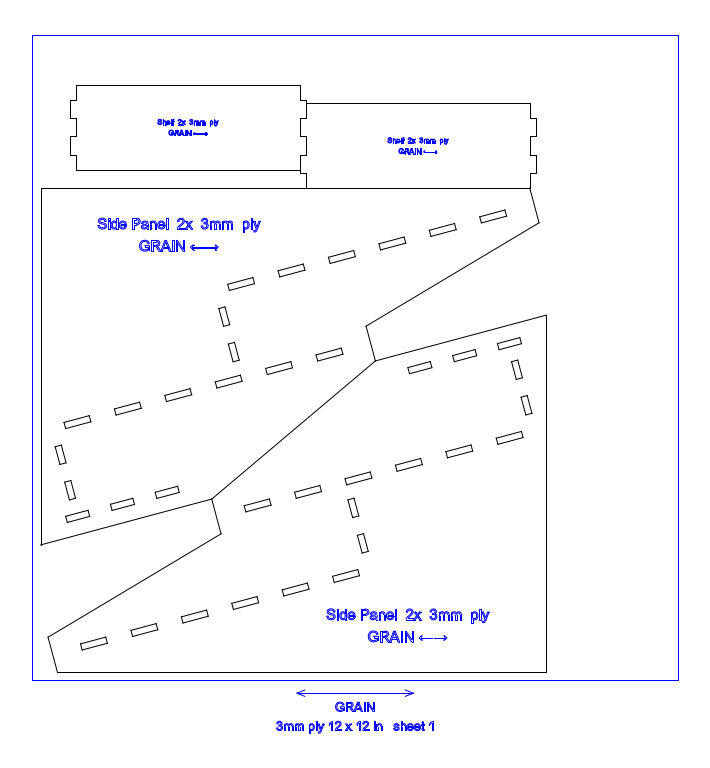
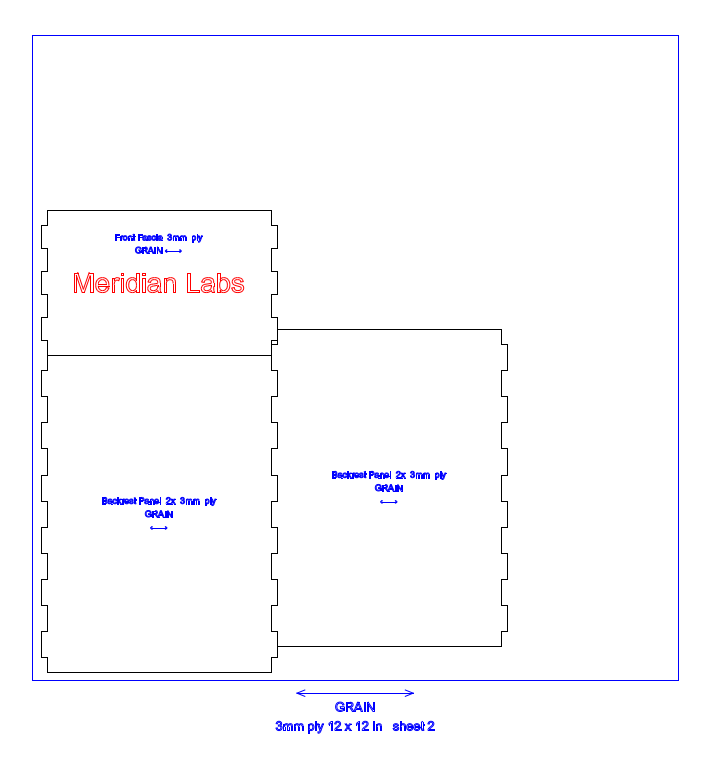
Laser-cut, done right

Anisotropic-stress and grain-direction labels, pieces sized to your stock, and clean per-panel files ready to cut

Examples

From a sentence to a finished part.

Every part here was described in a sentence. Interact with the model and download the actual file.

Why it's real

Always robust, always parametric.

Built on real CAD geometry

Every part is a true BREP solid — the same exact geometry professional CAD is built on.

Editable STEP solids

Open and edit the geometry in your own CAD, the same as any other model.

Print-aware

LexiCAD accounts for overhangs, wall thickness, and your nozzle diameter — intelligently optimized for printing.

Outputs & formats

Files that fit your workflow.

STEP

Editable, parametric-ready CAD. Opens in Fusion, SolidWorks, Onshape — anywhere.

STL · 3MF · OBJ

Print-ready meshes for any slicer, in whatever your workflow prefers.

DXF · SVG

Laser-cut profiles — one DXF/SVG file per profile, ready to cut.

Straight answers

FAQ

It can make parametric mechanical parts — brackets, enclosures, fixtures, mechanisms — plus algorithmic geometry, threads, gears, and laser-cut objects. It can work from your existing files and produce technical drawings. Large multi-part assemblies are still limited, but it can make assemblies with a few pieces.

It builds to the exact dimensions you specify — real units, flat faces, not an approximation. Say 45 mm and the part comes out 45 mm.

You get real, editable CAD — a STEP file you can open and modify in your own tools, not a frozen mesh. You can also edit parameters directly in LexiCAD.

It tells you. If a request is beyond what it can do well, or a design would be unmanufacturable, it says so plainly and explains why — rather than handing you a file that looks right and fails on the printer.

A general chatbot is a generalist — ask it for a part and it will try, usually by handing you a script to run yourself. It works blind: it can't render or measure what it made. LexiCAD is the specialist — it writes and runs real CAD code, renders the result, measures it against your spec, and iterates until the model holds up. You get a finished, manufacturable STEP, not an unverified attempt.

Lincoln Clarke

Lincoln Clarke — Founder

Penn M&T · Electrical engineering & Wharton

I work at the intersection of computation and the physical world.

More of what I've built is on lincolnclarke.com.

Reach me directly at lincoln@lexicad.com.

Launching soon

Be the first to know when it's live.

Drop your email and I'll let you know the day LexiCAD goes live.

Building something serious?

If you're a maker, engineer, or shop with complex parts to make, I'd rather talk than add you to a list. Email me directly at lincoln@lexicad.com and tell me what you're working on — the power users are exactly who I want to hear from.